ChromaPrint AI vs coloring.app: Full Comparison (2026)
Both tools turn photos into coloring pages. The difference is in how - and that difference is visible in the output. Here is a detailed comparison across the dimensions that actually matter when you want to print a photo of your child, pet, or family as a coloring page.
Side-by-Side Output Comparison
The most important comparison is the output itself. Here is a real photo processed through ChromaPrint AI. The subject is recognizable - the face, fur texture, and pose are preserved as clean, colorable outlines.

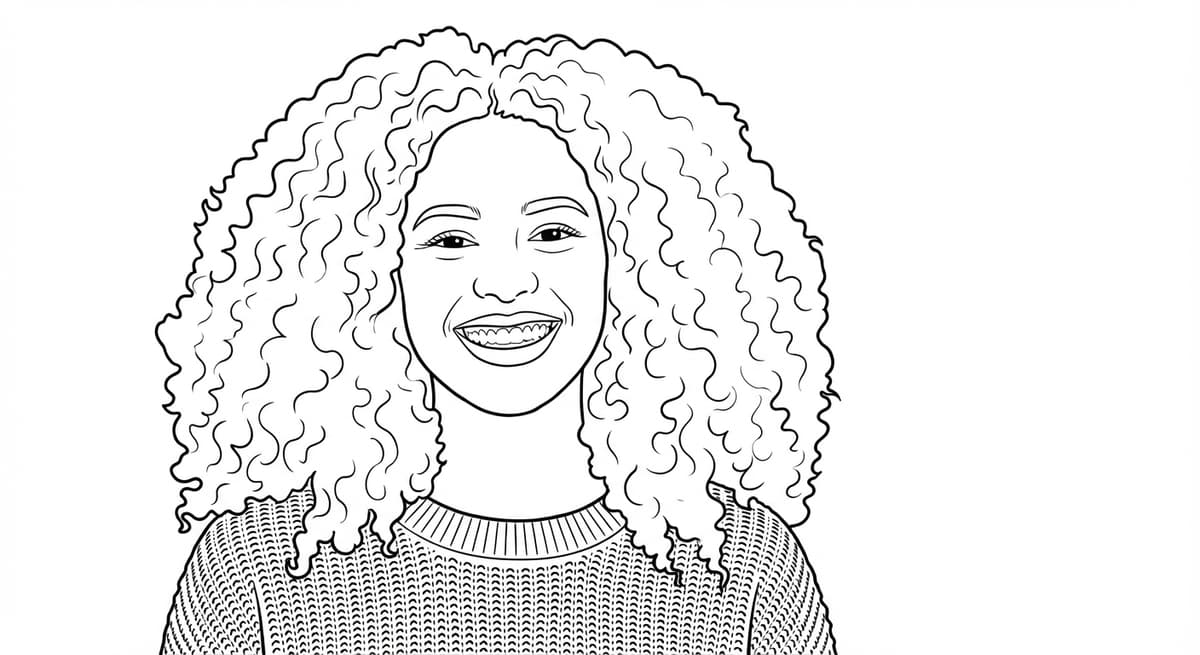
Every curl preserved. Face recognizable. This level of identity preservation is what filter-based tools cannot produce.
Feature Comparison
| Feature | ChromaPrint AI | coloring.app |
|---|---|---|
| AI method | Generative AI (understands content) | Filter-based edge detection |
| Identity preservation | Strong - faces and subjects preserved | Limited - depends on photo contrast |
| Background removal | One-click toggle, AI-powered | Available on higher plans |
| Output resolution | 300 DPI A4 (2480×3508px) | Varies by plan (lower on free) |
| Download formats | PNG + PDF | PNG (PDF on paid plans) |
| Google Photos import | Yes - native Picker integration | No |
| Bulk generation | Up to 10 photos in parallel | Available on higher plans |
| Caption overlay | Yes - custom text, 3 font styles | No |
| Free preview | Yes - watermarked, no card required | Limited free tier |
Pricing Comparison
| Scenario | ChromaPrint AI | coloring.app |
|---|---|---|
| 1 coloring page | $0.50 (1 credit) | Subscription required |
| 5 coloring pages / month | $2.50 | Monthly plan cost |
| 20 coloring pages / month | ~$8 (volume pack) | Monthly plan cost |
| Pricing model | Pay per download - no monthly fee | Subscription |
ChromaPrint pricing: credits from $0.50 each, volume discounts available. coloring.app pricing as of March 2026 - verify current rates at coloring.app.
Where coloring.app Does Well
Being accurate means noting where the competitor has genuine strengths:
- Style variety. coloring.app offers more visual style presets - manga, cartoon, sketch, and others. If you want a stylized interpretation rather than a faithful line art, there are more options.
- Established community. coloring.app has been around longer and has a larger user base with reviews, tutorials, and community-generated content.
- In-app coloring. coloring.app includes an in-app coloring interface - you can color the result digitally without downloading. ChromaPrint is focused on print output only.
The Verdict
The right choice depends on what you want to do with the output:
- For printing photos of real people and pets - ChromaPrint AI. Identity preservation is the deciding factor, and the generative AI approach has a decisive advantage over filter methods on photos with faces.
- For digital coloring and stylized interpretations - coloring.app may suit you better if you want to color on-screen and don't need the output to look like the original person.
- For occasional use - ChromaPrint's per-download pricing is significantly cheaper than a subscription you may use only a few times per month.
Frequently Asked Questions
Is ChromaPrint AI better than coloring.app?
For personal photos of people and pets, ChromaPrint AI produces cleaner results with stronger identity preservation. coloring.app offers more style presets but uses methods that lose subject identity on complex photos.
Which is cheaper - ChromaPrint AI or coloring.app?
ChromaPrint AI uses a pay-per-download model from $0.50 per coloring page. For occasional use (under 10–15 downloads per month), ChromaPrint is cheaper than a subscription.
Does coloring.app preserve faces in coloring pages?
coloring.app uses filter-based methods that detect image edges without understanding content. Facial features are often lost or distorted, especially in photos with complex lighting. ChromaPrint AI is specifically optimized for identity preservation.
What resolution do both tools output?
ChromaPrint AI outputs at 300 DPI A4 (2480×3508px) - the professional print standard. coloring.app output resolution varies by plan.
Try ChromaPrint AI free
Upload any photo. Free watermarked preview in 30 seconds. No credit card required.
Create your coloring page →