AI Coloring Page Generator vs Photoshop: Which Produces Better Line Art?
Photoshop has had edge-detection filters for 25 years. AI coloring page generators have existed for about two. This comparison is not as one-sided as those dates suggest - but the winner is clear, and the reason comes down to one thing: does the tool understand what it's drawing, or is it just processing pixels?
How Photoshop Creates “Coloring Pages”
Photoshop offers several approaches. None were designed for coloring pages:
- Find Edges filter. Detects pixel contrast transitions and draws a line wherever brightness changes sharply. It treats skin pores, fabric texture, hair strands, background noise, and a person's facial outline identically - all become lines. Result: a noisy web of marks.
- Sketch filters (Photocopy, Stamp, etc.). Posterize the image into high-contrast areas. Work reasonably on simple silhouettes. Break down completely on faces and complex detail.
- Gradient Map + Threshold. Converts to black and white with a hard cutoff. The line you get is determined by lighting conditions in the photo, not by the actual shape of the subject.
- Manual path tracing. A skilled designer traces the subject using the Pen tool. Produces professional results. Takes 2–10 hours per image. Not a practical option for personal photos.
How AI Creates Coloring Pages
AI tools like ChromaPrint use large generative models that understand image content semantically - they know what a face looks like, what clothing is, what a pet's fur texture should simplify to. The transformation is not filter-based; it's more like asking an illustrator to redraw the photo as line art.
The model decides which edges matter (facial features, clothing outlines, hair silhouette) and which to ignore (skin texture, fabric weave, background noise). The result is what a human colourist would produce if asked to copy the image as line art — not what a math function produces when applied blindly to pixels.
Real Example: The Same Photo, Two Methods
Below: the original photo on the left, and the ChromaPrint AI output on the right. A Photoshop Find Edges result on the same image produced a noisy tangle of marks with no clean outlines - not suitable as a coloring page.
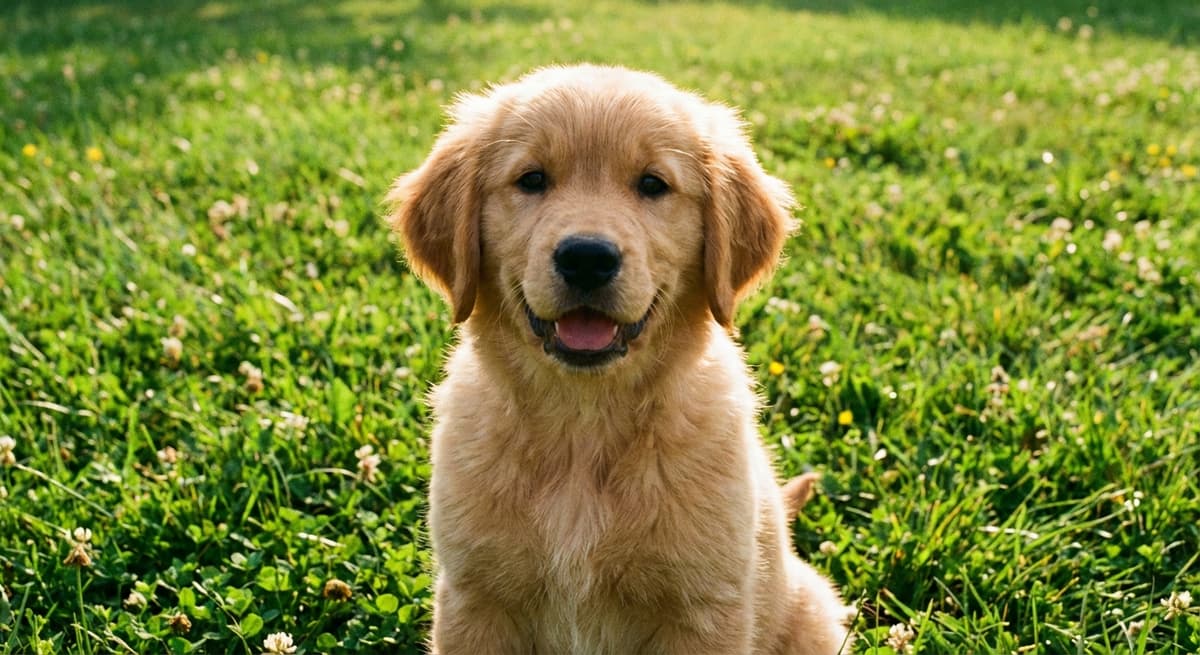
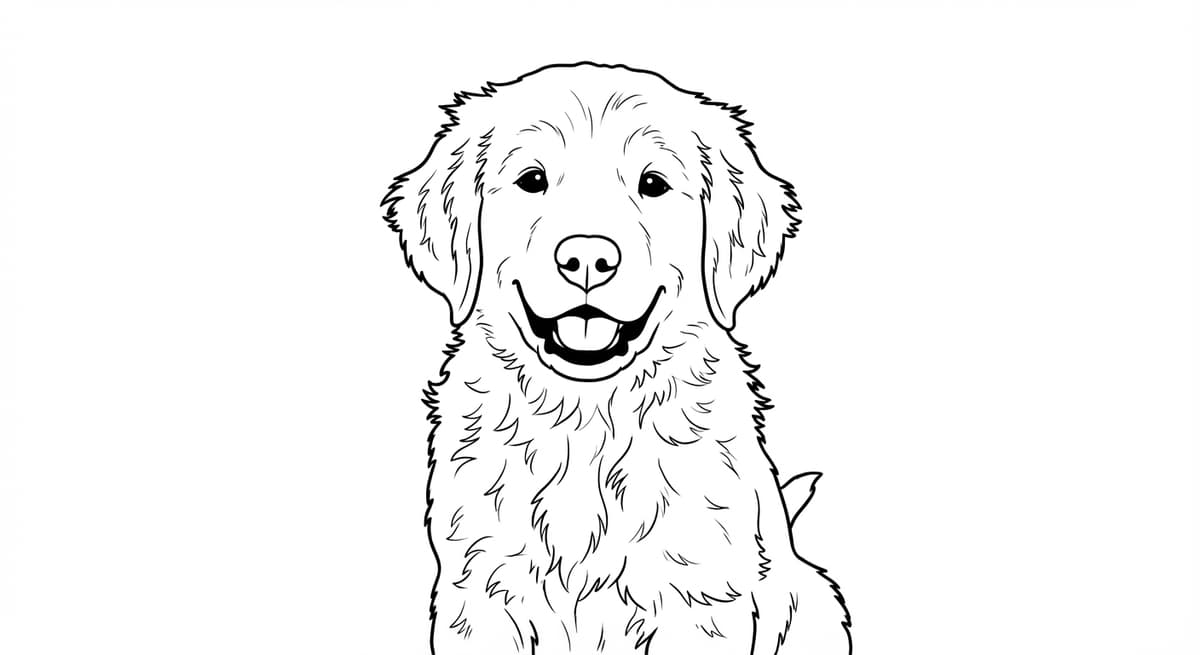
Fur texture simplified to clean colorable areas - not achievable with Photoshop edge detection filters.
Head-to-Head Comparison
| Dimension | Photoshop filters | AI (ChromaPrint) |
|---|---|---|
| Line cleanliness | Noisy - detects texture, lint, shadow as lines | Clean - selects meaningful edges only |
| Identity preservation | None - no concept of face or subject | Strong - preserves facial features and pose |
| Time to result | 10–30 min (filter); 2–10 hrs (manual trace) | 15–30 seconds |
| Background removal | Manual selection required (Subject Select + refine) | One-click toggle |
| Skill required | Intermediate to advanced Photoshop knowledge | None - upload and click |
| Output resolution | Whatever the source file is (no upscaling) | Standardized 300 DPI A4 |
| Cost | $20–55/month (Adobe subscription) | $0.50/credit (free preview) |
When Photoshop Is Still the Right Tool
Photoshop beats AI in one scenario: logos, icons, and clean vector-style graphics.A simple logo with crisp edges and solid colors will trace cleanly with Photoshop's high-contrast filters or with Live Trace in Illustrator. No facial features to preserve, no complex texture to simplify. For that use case, a dedicated vector tool is faster.
For photos of real people, pets, or any subject with organic texture and complex outlines - the scenario that makes up 95% of “I want to make a coloring page” requests - AI wins by a margin that isn't close.
The Verdict
AI for photos. Photoshop for graphics. The core reason: Photoshop processes pixels. AI processes meaning. When the subject is a human face - the most common thing people want to turn into a coloring page - only the tool that understands what a face is can preserve it accurately. Photoshop filters produce a noise map. AI produces a coloring page.
Frequently Asked Questions
Can Photoshop make coloring pages from photos?
Yes, but results are inconsistent. Filter-based methods detect every pixel-level edge including noise and background. The result is a noisy outline, not a clean coloring page. Manual path tracing works but takes 2–10 hours per image.
What is the best way to turn a photo into a coloring page?
For photos of real people or pets, AI is the best method. AI understands what it is looking at and draws it as a human illustrator would - clean outlines, white interiors, no noise.
Does Photoshop preserve faces when making coloring pages?
No. Photoshop edge-detection has no concept of identity. It treats skin pores and facial outlines identically. AI generators trained on the task understand facial anatomy and preserve likeness.
How long does it take to make a coloring page in Photoshop?
Filter-based methods take 10–30 minutes for a noisy result. Manual path tracing takes 2–10 hours. AI tools like ChromaPrint take 15–30 seconds.
See the difference yourself
Upload any photo and get a free AI-generated coloring page preview in 30 seconds.
Try ChromaPrint AI free →